Spotify API Widget
El widget de Spotify muestra la canción que el usuario está escuchando (o la última reproducida) en tiempo real. La integración usa el flujo OAuth 2.0 Authorization Code con auto-healing de tokens.
Flujo de ejecucion de API:
flowchart TD
    A[MusicWidget Livewire] -->|wire:poll.30s| B[SpotifyService]
    B -->|Cache hit| C[Retorna datos cacheados]
    B -->|Cache miss| D{¿Access token válido?}
    D -->|Sí| E[GET /me/player/currently-playing]
    D -->|No| F[Refresh token → nuevo access token]
    F --> E
    E -->|200| G[Formatear track]
    E -->|204| H[GET /me/player/recently-played]
    E -->|401| I[Invalidar token + retry]
    G --> J[Cachear 15s]
    H --> J
Arquitectura:
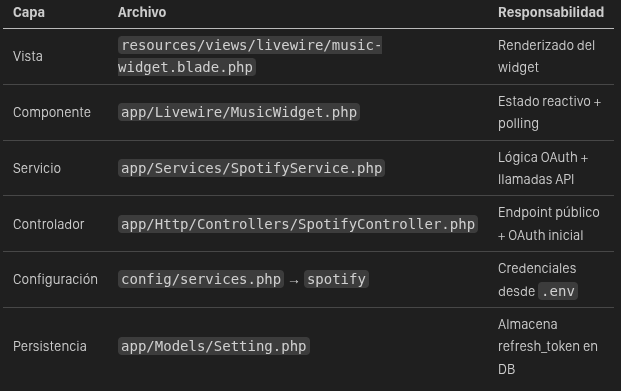
Variables a modificar en el (.env):
SPOTIFY_CLIENT_ID=tu_client_id
SPOTIFY_CLIENT_SECRET=tu_client_secret
SPOTIFY_REDIRECT_URI=https://marcestruch.es/spotify/callback
SPOTIFY_REFRESH_TOKEN=tu_refresh_token_inicial
[!IMPORTANT] El SPOTIFY_REFRESH_TOKEN del .env solo se usa como semilla inicial. Una vez que el sistema lo guarda en la tabla settings, la DB tiene prioridad. Si Spotify rota el token, el nuevo se guarda automáticamente en DB.
PASO 1:
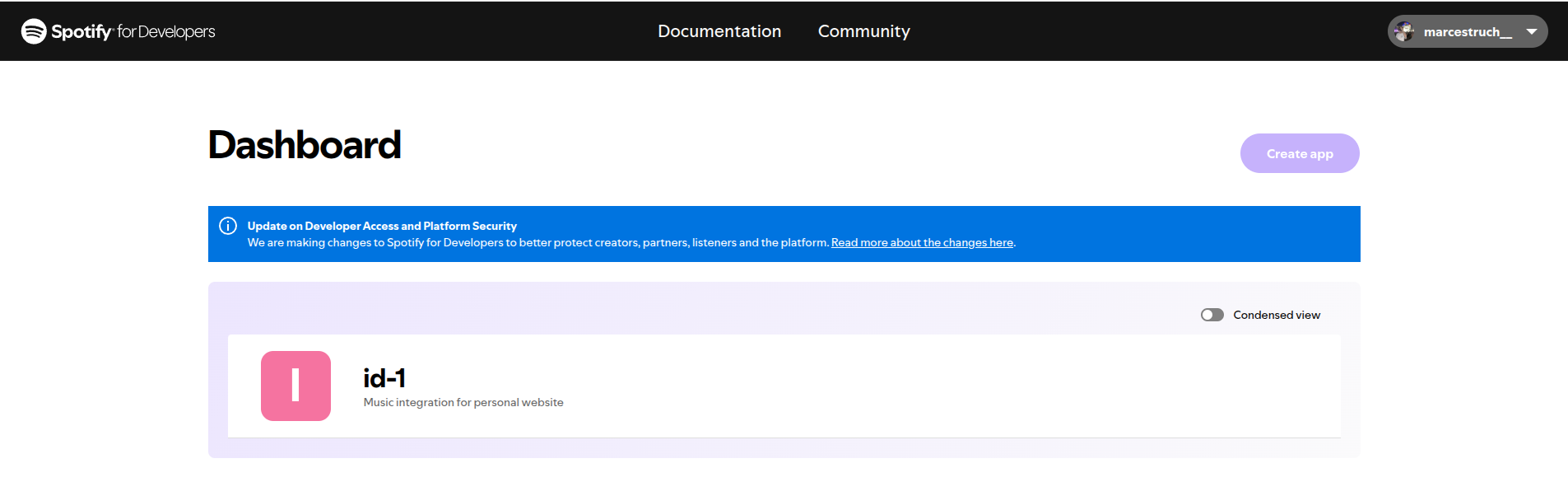
Ve a Spotify Developer Dashboard
Crea una nueva aplicación
Añade https://marcestruch.es/spotify/callback como Redirect URI
Copia Client ID y Client Secret al .env
Crea una nueva aplicación
Añade https://marcestruch.es/spotify/callback como Redirect URI
Copia Client ID y Client Secret al .env
PASO 2:
Temporalmente, registra estas rutas en routes/web.php:
Route::get('spotify/redirect', [SpotifyController::class, 'redirectToSpotify']);
Route::get('spotify/callback', [SpotifyController::class, 'handleCallback']);
Visita /spotify/redirect en el navegador. Spotify pedirá permisos y redirigirá de vuelta con un refresh_token.
PASO 3:
El callback mostrará el refresh_token. Cópialo al .env y elimina las rutas temporales.
[!WARNING] Los scopes requeridos son user-read-currently-playing y user-read-recently-played. Si el widget no funciona, verifica que la app de Spotify tiene estos permisos.
Gestión de Tokens (Auto-Healing)
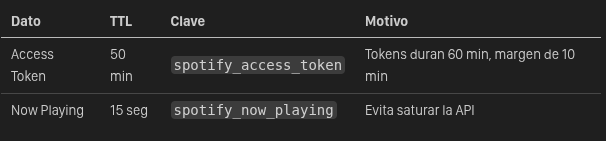
Flujo de Refresh
public function getAccessToken(): ?string
{
    return Cache::remember('spotify_access_token', 3000, function () {
        // 1. Obtener refresh_token (DB > .env)
        $refreshToken = $this->getRefreshToken();

        // 2. POST a https://accounts.spotify.com/api/token
        $response = Http::asForm()->post(self::TOKEN_URL, [
            'grant_type'    => 'refresh_token',
            'refresh_token' => $refreshToken,
            'client_id'     => config('services.spotify.client_id'),
            'client_secret' => config('services.spotify.client_secret'),
        ]);

        // 3. Si Spotify rota el refresh_token, guardarlo
        if (!empty($data['refresh_token'])) {
            Setting::set('spotify_refresh_token', $data['refresh_token']);
        }

        return $data['access_token'];
    });
}
Endpoint Público:
GET /api/spotify/now-playing{
"is_playing": true,
"title": "Bohemian Rhapsody",
"artist": "Queen",
"album": "A Night at the Opera",
"album_image": "https://i.scdn.co/image/...",
"song_url": "https://open.spotify.com/track/..."
}Comportamiento:
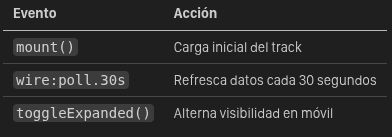
Coste:
- Gratuito (Spotify for Developers Free Tier).
Límites (Rate Limits):
- Spotify impone límites de peticiones por ventana de 30 segundos. Explica que usas Caché en Laravel para no superar este límite.